
How to hide the Instagram Explore page and home feed
Instagram doesn't let you hide the Explore page or the home feed. The closest built-in option is the Following feed, which you have to choose every time. To hide both for good on iPhone, use Unscroll: Explore and the feed are off by default, and you can bring back a feed of only the accounts you follow if you want one.
What the Following feed does
Tap the Instagram logo at the top of the home screen and choose Following. You'll see posts from accounts you follow, newest first, with no suggested posts. It's a real improvement, but Instagram resets to the For you feed the next time you open the app, and Reels still appear in it.
Why Explore is the hardest part to avoid
Explore sits behind the search icon, so every time you look up a friend, a grid of videos picked to grab you is already on screen. It's how a ten-second search turns into half an hour. Instagram doesn't let you clear or switch off that grid, only reset your suggestions.
Hide Explore and the feed in Unscroll
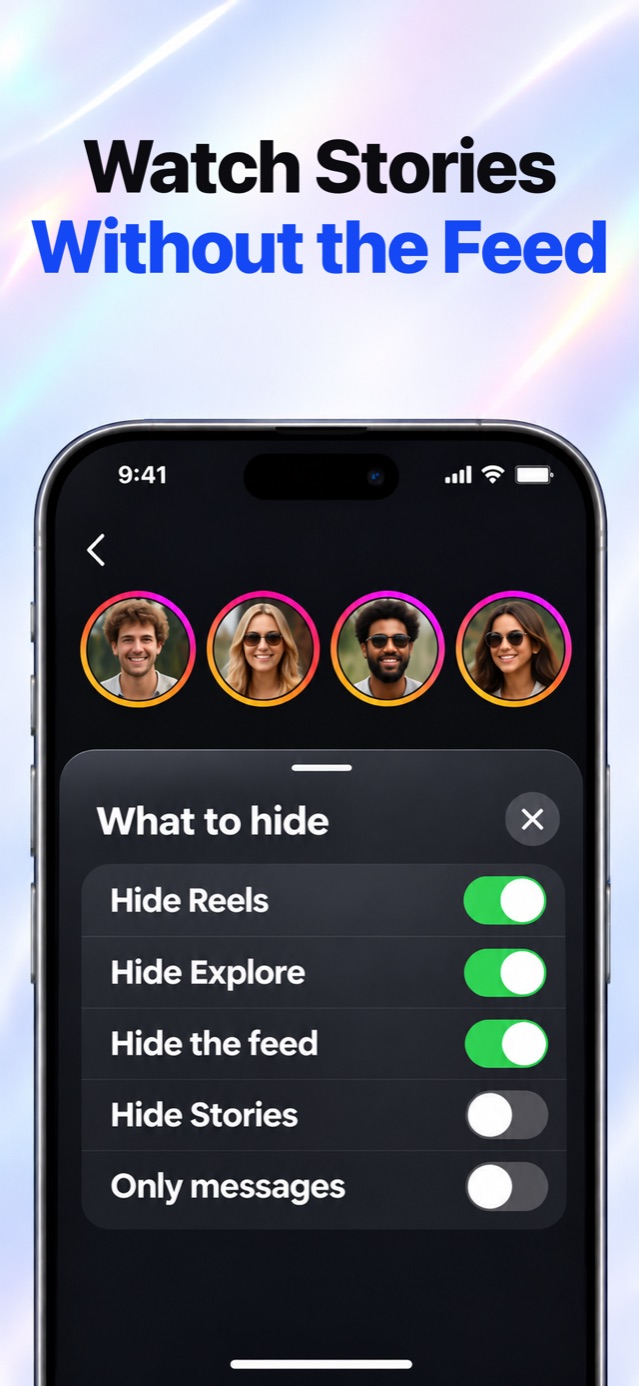
In Unscroll, the What to hide panel has separate switches for Reels, Explore, the feed and Stories. Explore and the feed start switched off. Search still works for finding people to message, without the video grid around it.
If you want to keep up with friends' posts, turn the feed back on and it shows only accounts you follow.
Keep the parts that are actually social
Hiding the feed doesn't mean cutting people off. Stories from friends, replies to stories, group chats and shared posts still reach you. You see what people send you on purpose, and the algorithm stops choosing for you.
Finding people without Explore
The main reason people open the search tab is to find someone: a new classmate, a shop, a friend of a friend. In Unscroll you can search for accounts to message from the inbox, and the results are just names and profile pictures. No video grid loads around them.
If you want to look at someone's profile and recent posts, you can still open it. Once you leave the profile, you're back in your inbox, with no suggested accounts or related Reels waiting to pull you further in.
Common questions
Can I reset the Instagram Explore page?
Yes. In Instagram's settings, under Content preferences, you can reset suggested content. The grid refills within a day or two, though.
Will hiding the feed stop me seeing friends' posts?
Only if you want it to. In Unscroll you can keep a feed of accounts you follow, or use stories and DMs only.