
How to stop scrolling on Instagram
The most reliable way to stop scrolling (and doomscrolling) on Instagram is to remove the feeds you scroll, Reels, the home feed and Explore, while keeping the messages you actually need. Willpower and time limits fade within a week or two. Changing what's on the screen keeps working.
Why Instagram is so hard to put down
Reels play the next video automatically and never run out. You don't know if the next one will be great or boring, and that uncertainty is what keeps your thumb moving. Add a red badge from a DM and you're back in the app many times a day.
Most people don't want to quit Instagram. They want to reply to their sister and see a friend's holiday story without losing the next hour.
Remove the scroll and keep the people
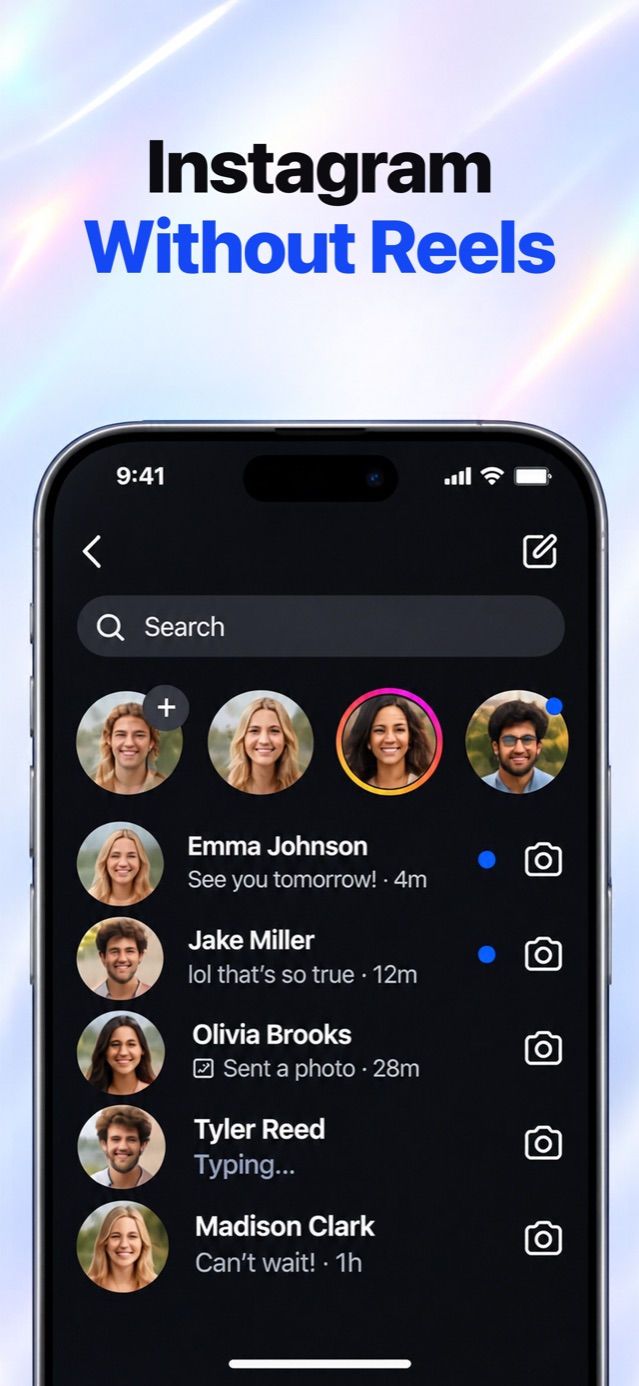
Unscroll was built around that split. It opens on your inbox. Stories from people you follow can stay, and Reels, Explore and suggested posts are gone. With nothing to scroll, a quick reply stays quick.
The app also counts the time you get back and each time you turn down the scroll, so you can watch your week add up.
Make the Instagram app harder to open
Habit is the other half. Unscroll can lock the Instagram app through Screen Time. If you try to open it, you hit a lock screen. To get in, you go to Unscroll, pick a reason and choose 5 to 10 minutes, with three unlocks a day. That pause is often enough to change your mind.
More habits that help
A few small changes add up:
- Charge your phone outside the bedroom, so the first and last scroll of the day go away.
- Turn off every Instagram notification except messages.
- Unfollow or mute accounts that leave you feeling worse.
- Pick something to do with the time you save, like a book on your nightstand or a walk after lunch.
Check whether it's working
Before you change anything, open Settings, Screen Time on your iPhone and note how many hours Instagram took last week. That number is your starting point. People are often surprised; two or three hours a day is common.
After the change, Unscroll keeps its own count of the time you get back and how many times you skipped the scroll. Compare the two after a week and again after a month. If the number is creeping back up, look at when it happens. Late evenings and the first minutes after waking are the usual times, and they're easier to fix once you know.
Common questions
Is deleting Instagram better than blocking Reels?
If you don't need it, deleting works. A lot of people end up reinstalling because their friends message them there, which is why keeping DMs and dropping the feed tends to last longer.
How long does it take to break the scrolling habit?
It varies from person to person. The first week is usually the hardest, so give it a full month before judging.